Robot catalog
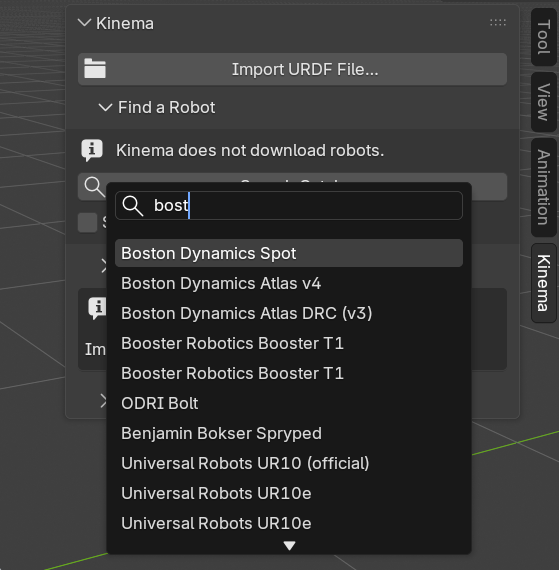
Kinema ships a catalog of 186 real robots — arms, humanoids, quadrupeds, drones, grippers and mobile manipulators. Kinema panel → Find a Robot → Search Catalog… opens the picker.
It tells you where to get one. It does not fetch it.
The picker shows the entries worth using, which is not quite all 186: a few are hidden as duplicates or known-broken until you tick Show all variants.
Changed in 0.3.0
The catalog used to download a robot when you picked it. It no longer downloads
anything — Blender extensions may not fetch code or data after install, and robot
descriptions are somebody else's repositories on somebody else's terms. Picking a robot
now hands you a git clone command instead. See what you get below.
What each entry tells you
Robots are listed as maker + model (Universal Robots UR5e, Boston Dynamics Spot),
with a line underneath carrying:
- Degrees of freedom — how many joints move
- Tags — what kind of machine it is
- Format — whether the file is URDF, xacro or MJCF
- Licence — the SPDX identifier of the robot description's licence
Type to filter. The list is long; searching by maker or model is faster than scrolling.
What you get
Pick a robot and Kinema puts a block like this on your clipboard:
git clone https://github.com/UniversalRobots/Universal_Robots_ROS2_Description.git
# cd Universal_Robots_ROS2_Description && git checkout 22f055da2fa7
# then open: urdf/ur.urdf.xacro
All three lines paste into a terminal safely — the last two are shell comments, so a paste clones the repository and does nothing else.
The panel shows the same thing without the shell syntax, plus an Open Repository button that opens the project in your browser.
Then load the file it names with Import URDF File….
The file path is the part that saves you time
Cloning is easy. Finding the one description in what you cloned is not:
mujoco_menagerie is 2466 files and backs 49 of the catalog's robots. The catalog
records which file to open for 185 of the 186 entries.
Show all variants
Off by default. The catalog is curated: entries that duplicate another, are known broken, or
work only partly are marked and hidden, so searching UR5e returns the one worth using
rather than three near-identical results.
Tick Show all variants to see them anyway, each labelled with why it was set aside and, for duplicates, which entry to use instead.
Tags
| Tag | What it is |
|---|---|
arm |
A single robot arm — the classic industrial manipulator |
dual_arm |
Two arms on one torso |
end_effector |
A gripper or hand on its own, no arm |
humanoid |
Two arms, two legs, a torso |
quadruped |
Four legs |
biped |
Two legs, no arms |
mobile_manipulator |
An arm on a moving base |
wheeled |
A wheeled base |
drone |
A flying platform |
Licences
Robot descriptions carry their own licences, independent of Kinema's. The catalog shows each one because it matters: some are permissive, some restrict commercial use, some require attribution.
If the robot appears in work you ship, check its licence. Kinema being GPL says nothing about the terms attached to a given manufacturer's CAD.
Formats
Catalog robots come as URDF, xacro or MJCF, and some offer more than one. Kinema reads all three, so the format is not something you need to choose. Where several exist the catalog names the URDF, then the xacro, then the MJCF — the order Kinema handles best, since URDF is what the solver speaks natively.
38 of the entries ship only a xacro, which Kinema expands on import like any other xacro file.
Where the data comes from
The catalog is generated from
robot_descriptions.py and
ships inside the add-on as JSON. Nothing about browsing it touches the network, and the
add-on no longer declares a network permission at all.
That also means the catalog is a snapshot: repository URLs and pinned commits are correct as of the Kinema release you have. If an upstream project moves, the entry goes stale until the next release.
When your robot is not listed
Use Import URDF File… with a local file. The catalog is a directory of well-known machines, not a limit on what Kinema can rig.
Known exceptions
Cassie contains a ball joint and will not import. A 3-DoF spherical joint has no honest single-axis bone equivalent.
eve_r3 is the one entry with no recorded file path: its description rewrites itself when loaded, so the path cannot be determined ahead of time. It is marked and hidden by default; the repository is still there under Show all variants if you want to go looking.